Freelance Contract Checklist: Scope, Payment, Revisions, and IP
Use this freelance contract checklist to clarify scope, revisions, payment, ownership, confidentiality, delays, and project cancellation.

Client communication for freelancers works best when expectations, updates, feedback, scope changes, and delays follow a simple written system.

In more than eight years of remote work, the most expensive communication problems I have seen were rarely caused by a missing app. They started with an assumption that was never written down: who approves the work, when feedback is due, what a revision includes, or whether a casual request changes the price. A simple communication system catches those assumptions before they turn into awkward conversations.
You do not need to stay online all day. The client needs to know how the project will run, when they will hear from you, what needs their attention, and what happens when something changes.
| Moment | What to communicate | Useful format |
|---|---|---|
| Before work | Scope, deadlines, response time, approvals, revisions, and payment | Kickoff email plus contract |
| During work | Completed work, next step, timeline, and anything needed from the client | Weekly or milestone update |
| After a decision | What was agreed, who owns the next action, and the due date | Short written recap |
| When something changes | Effect on scope, price, priority, and delivery | Change request with written approval |
| At handover | Files delivered, remaining actions, payment, and support limits | Closeout message |
Communication problems often start before the first task. The freelancer assumes email is the official channel. The client starts sending requirements through chat, comments in shared files, and voice notes. A week later, nobody is sure which request is current.
Confirm these points during onboarding:
You can put this into the project proposal before the client hires you. The guide to writing freelance proposals that get replies shows how to connect the client's problem, your approach, and the next step without burying them in process.
I’ll use email for project decisions and send a progress update every Tuesday. I normally reply within one working day, Monday to Friday. You can leave comments in the shared document, but I’ll confirm anything that changes the scope, price, or deadline by email before continuing.
Choose a response window you can keep. “Within one working day” is more useful than promising instant replies and then disappearing during focused work.
A friendly call is useful for discussing a project. It is a poor place to store the final agreement. After the call, send a summary covering the deliverables, exclusions, milestones, deadline, client responsibilities, revision allowance, price, and payment schedule.
This does not replace a suitable contract. It gives both sides a readable working plan and makes misunderstandings easier to catch.
Subject: [Project name] - scope and next steps
Hi [Client name],
Here is my understanding of the project after our discussion:
Deliverables: [List the agreed work]
First milestone: [Deliverable and date]
Final delivery: [Date and time zone]
Feedback needed: [What you need and by when]
Updates: [Day or milestone when you will update them]The quote includes [number] revision rounds. If the requirements change, I’ll explain the effect on the price and timeline before doing additional work.
Please reply if anything differs from your understanding. Otherwise, I’ll begin with [first task].
“Work is going well” sounds reassuring but does not tell the client much. A useful update says what is finished, what comes next, whether the deadline is still realistic, and whether you need a decision.
For a short project, milestone updates may be enough. For longer work, a weekly update gives the client a predictable rhythm without filling everyone’s inbox. Increase the frequency when a launch, deadline, or unresolved risk is close.
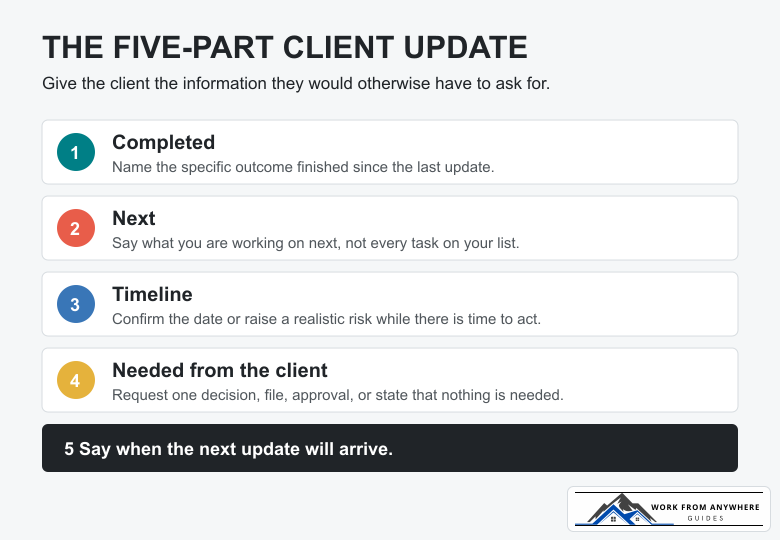
Subject: [Project name] - weekly update for [date]
Hi [Client name],
Completed: [Specific outcome finished]
Next: [What you will work on next]
Timeline: [On schedule, or revised date and reason]
Needed from you: [Decision, feedback, file, or “Nothing this week”]I’ll send the next update on [date].
Keep the update about outcomes, decisions, and risks. Most clients do not need a diary of every task. Put the update into the same weekly system you use to plan delivery work; the guide to weekly planning for freelancers with multiple clients includes a practical Friday review for catching overdue updates and blocked work.
Calls help when a problem needs discussion. They become risky when the decisions live only in somebody’s memory.
Send a short recap after the meeting:
Thanks for the call. I noted these decisions:
- [Decision or approved direction]
- [Action] - owner: [name], due: [date]
- [Action] - owner: [name], due: [date]
I’ll continue with [next step]. Please correct anything I misunderstood.
This matters most when several people attend or when a decision affects the deadline. The recap gives everyone one record to check instead of reopening the same conversation later.
“What do you think?” often produces vague feedback. Ask questions connected to the goal of the work:
If several stakeholders are involved, ask the client to appoint one person to combine feedback. Otherwise, you may receive contradictory instructions and have no clear way to decide which one has priority.
Hi [Client name],
[Deliverable or draft] is ready for review: [link].
Please check [the two or three areas that need attention]. It would help if you could send one combined set of comments by [date]. If I receive feedback by then, the planned delivery date remains [date].
If you need more review time, let me know and I’ll confirm the revised schedule.
A client asking for something extra is not automatically a difficult client. Projects change. The problem starts when extra work is accepted casually, with no agreement about cost, priority, or delivery.
Do not begin by arguing about whether the request is “small.” Compare it with the written scope. If it is additional work, explain the trade clearly and ask for approval.
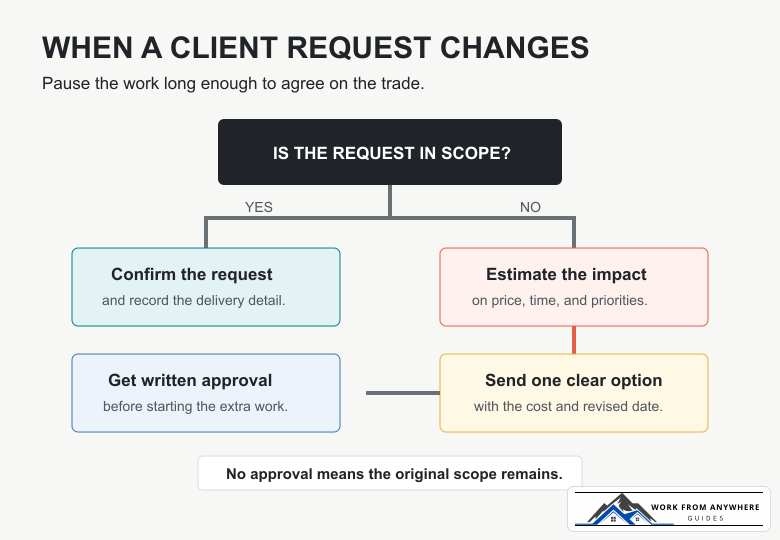
Subject: [Project name] - requested scope change
Hi [Client name],
I can add [requested work]. The current scope covers [original deliverable], so this would be additional work.
The change would add [amount] to the project and move delivery from [old date] to [new date]. Everything else in the original scope would stay the same.
If you want me to proceed, please reply with your approval. I’ll update the project plan before starting the additional work.
Use the freelance project calculator to check how added hours, costs, revisions, and payment fees affect the revised quote. If the client repeatedly ignores scope, payment, or access boundaries, compare the pattern with these freelance client red flags.
Silence makes a delay worse. Tell the client as soon as you have enough information to explain the risk clearly. Do not wait until the deadline has already passed.
A useful delay message includes what changed, what is complete, the realistic new date, your next action, and any decision needed from the client.
Subject: [Project name] - timeline update
Hi [Client name],
I need to revise the delivery date for [deliverable]. [Brief, direct explanation.] The work completed so far is [status].
The realistic new delivery date is [date]. My next steps are [actions].
If the original date is fixed, I can prioritize [essential part] and move [lower-priority part] to a second delivery. Let me know which option works better.
Avoid dramatic apologies and long excuses. Take responsibility for what you control, give the client a realistic plan, and do not promise another date unless you believe you can meet it.
A boundary works best when the client knows what they can expect, not only what you refuse to do.
I check project messages Monday to Friday and normally reply within one working day. Messages sent after 6 p.m. will be picked up the following working day.
This communicates the limit and the service. When you work across time zones, write the zone next to calls and deadlines. “Tuesday at 3 p.m.” is incomplete when the client, freelancer, and reviewer are in different countries.
Constant availability is not the same as good communication. A predictable response window protects focused work and gives the client a clear expectation.
Payment reminders become awkward when the message is vague or apologetic. State the invoice, amount, due date, and action required. Keep the tone calm and assume a mistake on the first reminder.
Subject: Invoice [number] - payment follow-up
Hi [Client name],
Invoice [number] for [amount and currency] was due on [date]. I have not yet seen the payment arrive.
Please confirm the payment status and expected transfer date. I have attached the invoice again for convenience.
If international transfer fees or currency conversion affect the amount received, write the payment route and invoice currency into the agreement. The guide to exchange rates and freelancer income explains the fee and conversion decisions worth recording.
When a client stops responding and you cannot continue without their feedback, send a message that protects the schedule:
Hi [Client name],
I’m waiting for [specific feedback or file] before I can continue with [deliverable]. If I receive it by [date], the current delivery date remains [date]. After that, I’ll need to reschedule the remaining work based on my next available time.
Please let me know whether the project should continue on that basis.
Do not keep an unlimited space open in your calendar for a silent client. State what you need and how the delay affects scheduling.
You do not need a new app for every client. You need one reliable place for each kind of information.
The worst setup is one where decisions are scattered across all five. Choose a simple system and tell the client how to use it.
Before the project:
During the project:
At the end:
Match the schedule to the project. A milestone update may be enough for a short assignment. Longer work may need a weekly update, with extra communication when a deadline, launch, or unresolved problem is close. Agree on the schedule at the beginning.
Set a response window that fits your working hours and keep it consistently. Many projects do not require immediate answers. A stated working-day response window is more helpful than being constantly available for a week and then going silent.
Record scope, prices, deadlines, approvals, and changes in the agreed official channel. If a decision happens on a call or in chat, send a short written recap afterwards.
Ask the client to connect the feedback to the project goal. Offer specific choices, confirm which part needs changing, and ask one person to combine comments when several stakeholders are involved. Do not begin a large revision until you understand what approval would look like.
For your next active project, write down four things: the official channel, your response window, the next update date, and who can approve changes. Send that short agreement before another assumption becomes extra work.


Use this freelance contract checklist to clarify scope, revisions, payment, ownership, confidentiality, delays, and project cancellation.

Compare freelance payment methods by country support, client convenience, total fees, currency conversion, withdrawal, and payment risk.
Leave a Reply
Comments