Freelance Contract Checklist: Scope, Payment, Revisions, and IP
Use this freelance contract checklist to clarify scope, revisions, payment, ownership, confidentiality, delays, and project cancellation.

A weekly planning system helps freelancers fit client work, admin, and buffer time into a realistic schedule without carrying everything at once.

A task list tells you what exists. It does not tell you what can fit into five working days.
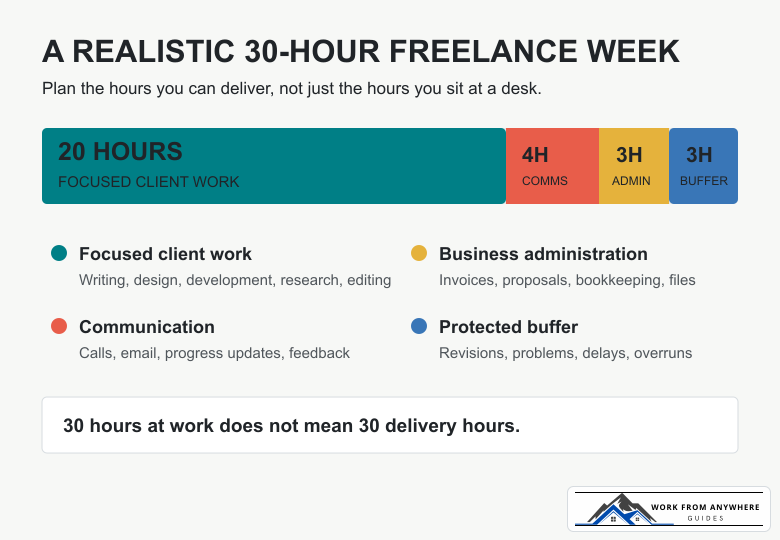
Start by deciding how many hours you can realistically use for focused work. This is not the same as the number of hours you intend to sit at your desk. Calls, email, invoices, revisions, file handling, and small client questions all consume part of the week.
Suppose you want to work 30 hours. A sensible first version might look like this:
| Type of work | Weekly allowance | What belongs here |
|---|---|---|
| Focused client work | 20 hours | Writing, design, development, research, editing |
| Meetings and communication | 4 hours | Calls, email, progress updates, feedback |
| Business administration | 3 hours | Invoices, bookkeeping, proposals, file organization |
| Buffer | 3 hours | Revisions, technical problems, delayed feedback, overruns |
That leaves 20 hours for planned delivery work, not 30. This difference is where many overloaded weeks begin.
Before adding a new job to those 20 hours, use the freelance project calculator to work through the project estimate. Then reserve time using the realistic figure, not the optimistic one you gave the task after a quick read.
Do not copy an entire project into the weekly plan. Choose the result that needs to exist by the end of the week.
“Work on the website” is vague. “Send the client a working homepage draft by Thursday” gives you a finish line. The outcome should be small enough to complete this week and clear enough that you know when it is done.
For each active project, write:
If you regularly handle several assignments at once, the guide to balancing multiple freelance projects covers the wider client and deadline decisions. This weekly system is the practical layer that turns those decisions into a calendar.
A weekly plan becomes useless when every item is treated as urgent. Sort work into three levels:
Limit the must-finish list to what fits inside your focused-work allowance. If the estimates total 27 hours and you have 20 available, the plan has already failed. Move something, reduce the scope, or speak to a client before Monday becomes a rescue operation.
Build the week from the least flexible commitments to the most flexible:
Do not divide every day into tiny pieces. Two focused blocks are often easier to protect than six short ones. A designer might reserve Monday morning for Client A, Monday afternoon for Client B, and leave late afternoon for email and admin. A writer may prefer one article-sized block per day.
Your calendar should match how the work is actually done. Use the site's remote-work time-management system for daily focus blocks, communication windows, breaks, and shutdown routines.
One giant task list makes a five-minute invoice look equal to a five-hour client deliverable. Keep at least four short queues:
The waiting list matters because blocked work still needs attention. Review it twice a week and send a direct follow-up when a client owes you something. Good client communication is part of planning, not an interruption to it.
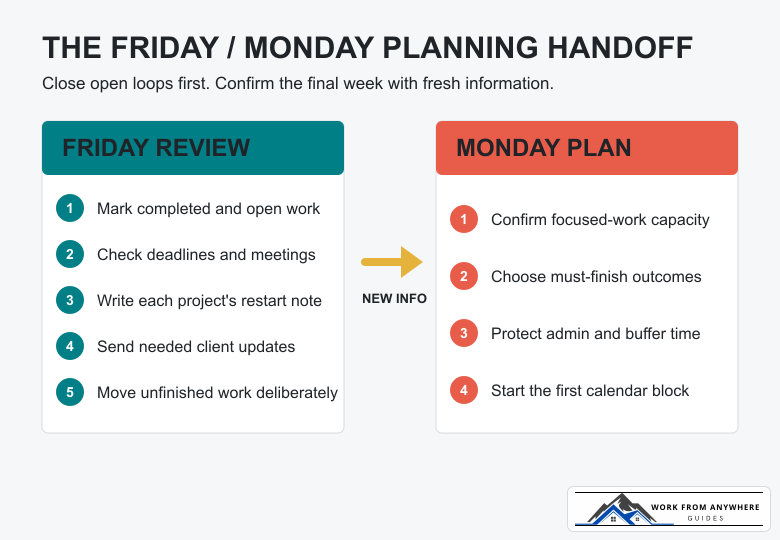
Use the last 20 to 30 minutes of your working week to close open loops. Friday is for collecting facts, not building a perfect plan.
A one-line restart note can save surprising amounts of time: “Homepage draft is complete; next step is mobile navigation after the client confirms the menu.” You will not have to reconstruct the whole project on Monday.
Plans made too early can be stale by Monday morning. Use Friday to review, then spend about 15 minutes on Monday confirming the week.
Check whether a client sent feedback, changed a deadline, or approved a proposal over the weekend. Then choose the must-finish outcomes, confirm your focused-work capacity, and place the first work block on the calendar.
This split keeps Friday useful without pretending nothing will change. It also gives Monday a clear starting point instead of an hour of inbox wandering.
Buffer time is not an empty space waiting for more work. It pays for the normal uncertainty of freelancing: a revision takes longer, software stops cooperating, a client asks for a small change, or your estimate was simply wrong.
If the week goes smoothly, use the buffer for a should-move task, proposal, portfolio update, or early finish. Do not fill it during planning just because the calendar looks available.
Track what consumes the buffer for four weeks. If revisions use it every week, your revision estimates or project terms need work. If calls consume it, you may need clearer meeting limits. The pattern is more useful than blaming yourself for being “bad at productivity.”
Do not solve an overloaded plan by working faster on paper. Use this order:
If new work arrives, treat it as a trade. Ask what leaves the plan before adding it. This is especially important after a promising inquiry. A strong freelance proposal is helpful, but winning the project does not create extra hours in the week.
Keep the template short enough that you will actually use it:
Available focused-work hours: [number]
Must finish: [up to three outcomes]
Should move: [one or two outcomes]
Waiting on: [client, item, follow-up date]
Admin block: [day and time]
Buffer: [hours kept unassigned]
First Monday work block: [specific next action]
You can keep this in a notebook, calendar, task manager, or plain document. The tool matters less than using one place for commitments and checking it at the same times each week.
For your next week, choose your available focused-work hours before choosing tasks. Give each active client one clear outcome, protect a visible buffer, and place the first Monday work block on your calendar. That is enough to start.



Use this freelance contract checklist to clarify scope, revisions, payment, ownership, confidentiality, delays, and project cancellation.

Compare freelance payment methods by country support, client convenience, total fees, currency conversion, withdrawal, and payment risk.
Leave a Reply
Comments