Freelance Contract Checklist: Scope, Payment, Revisions, and IP
Use this freelance contract checklist to clarify scope, revisions, payment, ownership, confidentiality, delays, and project cancellation.

Zoho Invoice is the easiest starting point if you want invoicing without a subscription. Wave makes more sense when your business is in the United States or Canada and you also want basic bookkeeping. Invoice Ninja is a good fit when you want more control over payment gateways. Bonsai is for freelancers who want proposals, contracts, projects, and invoices in one system. FreshBooks is the accounting-led option, but its client limits and normal subscription prices need a close look.
This comparison uses the companies' published pricing and feature documentation. It doesn't pretend every product was personally tested. Prices and availability were checked on August 1, 2026, and can change.
| Tool | Best for | Starting price | Main limitation |
|---|---|---|---|
| Zoho Invoice | Free invoicing for international freelancers | Free | Online payment options depend on your country and payment gateway |
| Wave | US and Canadian freelancers who also need bookkeeping | Starter: free; Pro: $19 USD/month or $25 CAD/month | New accounts are limited to businesses in the US and Canada |
| Invoice Ninja | Flexible payment gateways and recurring invoices | Free for up to five clients; Pro: $14/month | The free client limit is small |
| Bonsai | Proposals, contracts, projects, and invoices together | Essentials: $25/month or $19/month billed annually | The free limited plan can't create or send new invoices |
| FreshBooks | Freelancers who want invoicing inside an accounting system | Normal Lite price: $23/month | Lower plans cap the number of billable clients |
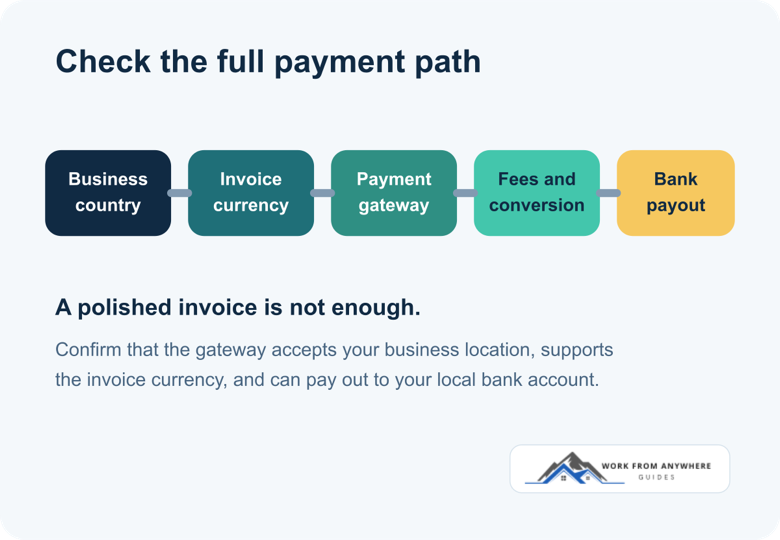
The invoice is only one part of getting paid. A polished PDF doesn't help much if the payment button is unavailable in your country, the client can't use their preferred method, or the exchange-rate spread removes more money than the subscription would have cost.
Before comparing templates and dashboard colors, write down how money actually moves:
If international clients pay you, read the guide to exchange rates, fees, and invoice currency before choosing a payment button.
Zoho says Invoice runs on a forever-free plan. It supports invoices, estimates, recurring invoices, payment reminders, expenses, time tracking, reports, and a customer portal. That is enough for many solo freelancers who don't need a full accounting package.
The useful part is that Zoho Invoice can connect to several payment gateways instead of forcing everyone through one processor. Its published integrations include PayPal, Stripe, Razorpay, Paytm, and others. Availability still varies by country. For example, Zoho Payments itself is available in the US and India editions, while other gateways have their own supported-country lists.
You want bookkeeping, banking, and local tax filing in the same product. Zoho Invoice focuses on invoicing. Zoho Books is the broader accounting product, and its price and country editions are separate.
Wave's Starter plan costs $0 and includes unlimited estimates, invoices, bills, and bookkeeping records. The Pro plan is listed at $19 USD per month or $25 CAD per month, with automation, bank transaction imports, receipt capture, branding, and other upgrades. Wave's pricing page also lists card and bank-payment processing charges separately.
The geographic restriction is the deciding factor. Wave says new accounts are available to businesses located in the United States and Canada. It isn't a practical recommendation for a freelancer in Pakistan, India, the Philippines, or most other countries, even if the free plan looks attractive.
Your business is outside the US or Canada, or you need a base currency other than USD or CAD.
Invoice Ninja's hosted free plan supports up to five clients and unlimited invoices. It includes recurring invoices, deposits, partial payments, a client portal, time tracking, and online-payment connections. The Pro plan is $14 per month or $140 per year and removes the client limit. The company also offers a self-hosted version for people willing to manage their own installation.
The payment-gateway choice is the main attraction. Invoice Ninja lists integrations including Stripe, PayPal, Square, and GoCardless. The software connection doesn't guarantee that a gateway will operate in your country, so verify the gateway before building your workflow around it.
You have more than five active clients but don't want a subscription, or you want a traditional accounting package rather than an invoicing system.
Bonsai is built around the whole client workflow. Its Essentials plan includes proposals, contracts, invoices, payments, scheduling, a client portal, expenses, and income tracking. It costs $25 per user each month, or $19 per user each month when billed annually. The cheaper Basic plan includes projects and time tracking, but not invoices.
This makes Bonsai easier to justify when you are currently stitching together separate tools for proposals, contracts, project work, and billing. It is expensive if all you need is a basic invoice.
You only send a few invoices, because the free limited plan can't create or send new invoices. A free dedicated invoicing tool will be simpler.
FreshBooks combines invoicing with expense tracking, estimates, payment collection, reports, and accounting features. Its published normal monthly prices are $23 for Lite, $43 for Plus, and $70 for Premium. Lite allows invoices to five clients, Plus raises that to 50, and Premium allows unlimited clients.
FreshBooks often runs large introductory discounts. Treat those as temporary. Compare the normal renewal price, not just the first few discounted months.
You need unlimited clients at a low price or only want to create and track invoices.
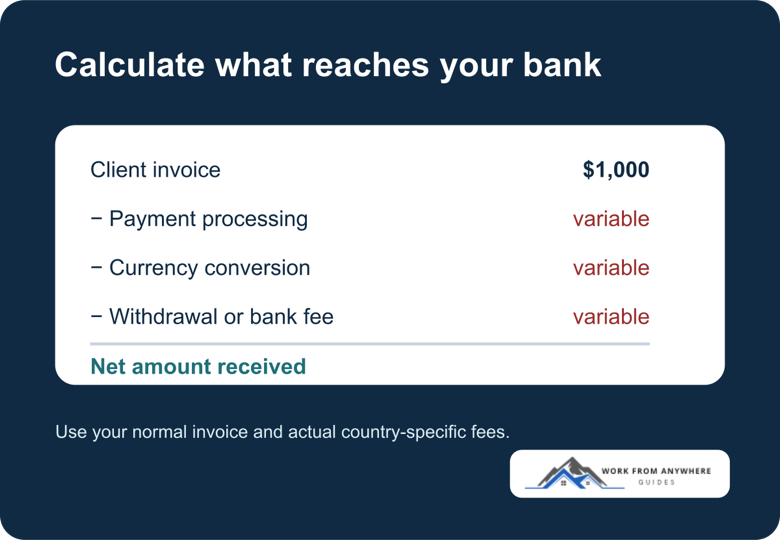
A free subscription doesn't mean free payment collection. Card processors and payment gateways normally charge per transaction. Currency conversion can add another cost, and your bank may charge for receiving or withdrawing money.
Run one example using a typical client invoice. For a $1,000 invoice, record the subscription cost, payment-processing fee, currency conversion, withdrawal fee, and the final amount that reaches your account. That comparison is more useful than counting how many templates each product offers.
Use the freelance project quote and take-home calculator with a project you might actually accept. Enter the expected hours, target rate, direct costs, revision buffer, platform fee, payment fee, and any fixed charge. If the client pays in another currency, add the exchange rate your payment provider is likely to use.
The calculator works backwards from the amount the project needs to cover and estimates what may remain after the fees you enter. It won't predict tax or guarantee what reaches your bank, but it makes a weak payment route easier to spot before you send the quote.
Once the system is selected, agree on the billing schedule before starting work. The client communication guide includes practical language for expectations, scope changes, delays, and payment follow-ups.
Start with country support and the payment gateway, then test one normal invoice from creation to bank payout. If the workflow is clear and the full cost makes sense, keep it. A longer feature list won't rescue a payment method that doesn't work where you live.
Use this freelance contract checklist to clarify scope, revisions, payment, ownership, confidentiality, delays, and project cancellation.
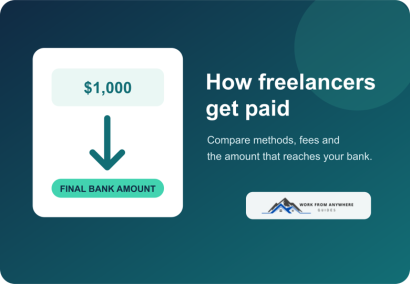
Compare freelance payment methods by country support, client convenience, total fees, currency conversion, withdrawal, and payment risk.
Leave a Reply
Comments