Async Communication for Remote Teams: How to Stop Living in Slack
Async communication should help remote teams protect focus, make decisions clearer, and stop treating every Slack message like an emergency.

Time blocking for remote workers works when the calendar protects focused work, groups meetings, and leaves enough buffer for a week that changes.

Time blocking sounds simple: put every task on the calendar and follow the plan. That version usually lasts until the first late meeting, urgent message, or household interruption.
The useful version is less rigid. You decide what kind of work belongs in each part of the week, protect the hours that need your best attention, and leave enough open space to recover when plans move. The calendar gives the week a shape without pretending you can predict every hour.
This guide focuses on building that weekly calendar. For the wider daily system, including priorities, communication windows, breaks, and a firm finish, use the time-management guide for remote workers.
Do not begin by dragging every task into your calendar. Start with the outcomes that would make the week successful.
For a remote employee, that might be:
For a freelancer, it might be:
These are outcomes, not activities. "Work on the report" can occupy the calendar all week without finishing anything. "Complete the first draft" tells you what the block needs to produce.
Keep the list short. Three major outcomes are enough for most weeks. Routine work, meetings, and messages will still happen around them.
Open a weekly calendar and add the things that cannot move:
This step matters because available time and usable time are different. You might technically have eight hours between 9 and 5, but three meetings scattered across that window can make a long concentration block impossible.
After eight years of remote work, one lesson has stayed consistent: a calendar packed from edge to edge will fail as soon as real work begins. Seeing the fixed commitments first lets you plan around the week you actually have.
You do not need a complicated color system. Five block types cover most remote-work weeks.
Use these for writing, coding, design, analysis, research, planning, or any work that becomes worse when interrupted. A focus block should name one outcome, not a category such as "project work."
Give it a clear label:
Most people need fewer focus blocks than they think. One protected block that produces something is worth more than several optimistic blocks you repeatedly move.
When possible, group meetings into the same mornings or afternoons. A 30-minute call rarely costs only 30 minutes. There is preparation before it, notes afterward, and the effort of returning to whatever you stopped.
If your team controls the meeting schedule, propose shared collaboration windows. If it does not, place lighter work near meetings and protect deeper work on the clearer days.
Email, chat, invoices, approvals, file organization, and task updates need time, but they do not need to sit open all day. Group them into one or two short windows.
This is where your calendar and communication agreements need to match. A focus block will not survive if everyone expects an answer in five minutes. Clear response windows and sensible escalation rules make time blocking possible.
Buffer is not empty time waiting to be filled. It is reserved capacity for work that runs long, urgent fixes, extra feedback, or the interruption you could not predict on Monday.
Put buffer on the calendar before the week begins. If nothing needs it, use it for a lower-priority task or finish early. Do not treat it as an invitation to accept another deadline.
Reserve the final 10 to 15 minutes of the day to update tasks, capture unfinished work, and choose the next starting point. A short shutdown block stops tomorrow from beginning with a reconstruction of yesterday.
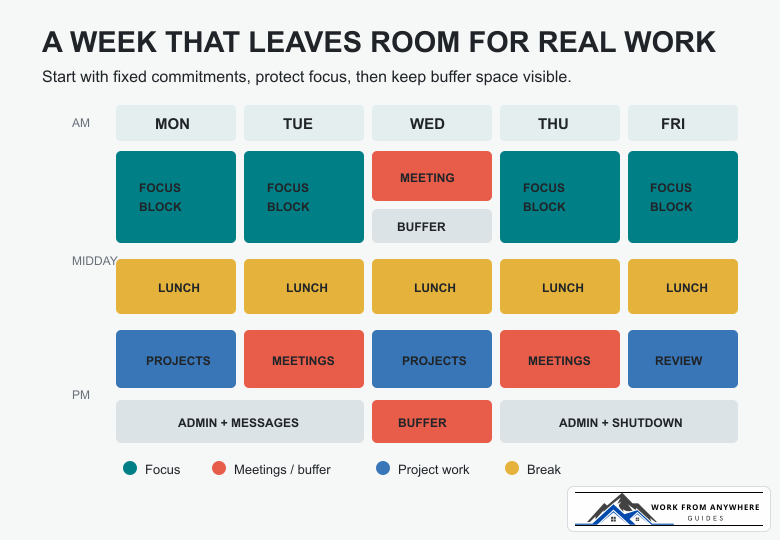
This example assumes a mostly flexible remote schedule. Move the hours to fit your job, energy, and time zone. Keep the sequence: fixed commitments first, focused work second, communication third, and buffer before the calendar fills.
| Time | Monday | Tuesday | Wednesday | Thursday | Friday |
|---|---|---|---|---|---|
| 9:00-10:30 | Focus block | Focus block | Team meeting and buffer | Focus block | Focus block |
| 10:30-11:00 | Messages | Messages | Meeting notes | Messages | Messages |
| 11:00-12:30 | Project work | Client or team calls | Project work | Client or team calls | Weekly outcome |
| 12:30-1:15 | Lunch | Lunch | Lunch | Lunch | Lunch |
| 1:15-3:00 | Project work | Meetings | Project work | Meetings | Review and delivery |
| 3:00-4:00 | Admin | Buffer | Admin | Buffer | Weekly review |
| Final 15 minutes | Shutdown | Shutdown | Shutdown | Shutdown | Plan next week |
The table is not a schedule you must copy. It shows the balance. Focus has protected space, meetings are grouped where possible, messages have boundaries, and the week contains room to recover.
Remote work often creates a visibility problem. When colleagues cannot see you working, a quiet status can be mistaken for absence. That pressure encourages people to keep chat open during work that needs concentration.
Use the tools your team already sees:
The point is not to disappear. It is to make availability predictable. Your team knows when you are concentrating, when you will respond, and how to interrupt you when something truly cannot wait.
A common mistake is treating open calendar space as unused capacity. That is how a manageable Monday becomes an impossible Thursday.
Leave meaningful gaps between demanding blocks. A video call followed immediately by detailed writing creates a hard transition. Ten or fifteen minutes to capture notes, stand up, and reopen the right context can prevent the next block from starting badly.
For freelancers managing several deadlines, weekly capacity needs a separate pass before the calendar is built. The weekly planning system for freelancers covers project outcomes, delivery capacity, client waiting time, and buffer in more detail.
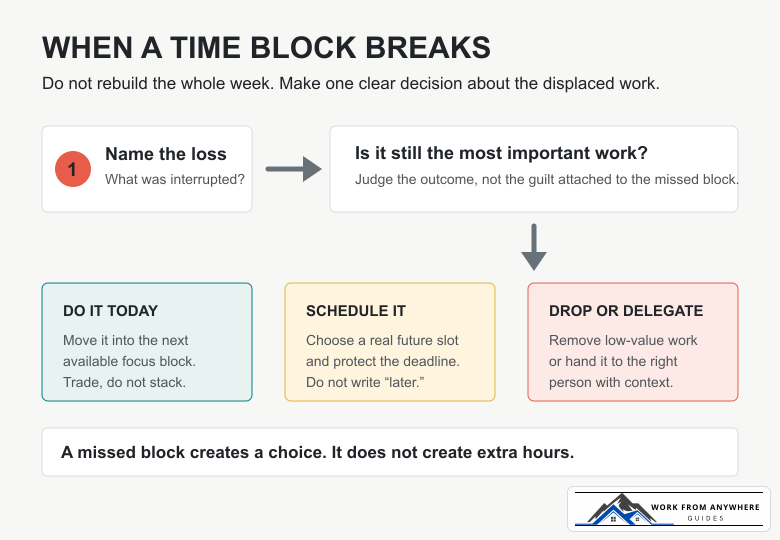
A missed focus block does not create two focus blocks tomorrow. Before moving the work, ask whether it is still the most important outcome.
Then make one decision:
Avoid creating a hidden debt of repeatedly moved blocks. If the same task moves three times, the problem is usually unclear priority, unrealistic duration, or reluctance to do the work. Changing its calendar color will not fix that.
Start with team meetings, shared collaboration hours, and deadlines. Protect one or two repeatable focus windows that colleagues can learn to expect. Use status messages and calendar visibility to make those windows normal rather than exceptional.
Separate delivery blocks from client communication, proposals, and administration. A calendar filled only with paid delivery work ignores the business tasks required to keep projects moving and invoices paid.
Your week will contain more interruptions, so shorter focus blocks and larger buffers may be more realistic. Group one-to-ones where possible, keep office hours for non-urgent questions, and reserve at least one block for decisions that require thought rather than immediate reaction.
Mark the hours where schedules overlap, then keep work outside that window asynchronous. Do not stretch your entire day to match everyone else's morning. A narrow collaboration window is easier to sustain than permanent partial availability.
You need a calendar and somewhere to keep tasks. That is enough.
The task list stores work that may need doing. The calendar holds the work you have actually committed time to. Do not schedule every small task. Group similar items into an admin block or communication block.
If your projects need assignments, dependencies, or shared visibility, use the site's guide to task-management tools for remote workers. Choose the lightest tool that gives the team the visibility it needs.
At the end of the week, compare the plan with what actually happened:
Change one thing in the next calendar. Move the focus block, shorten the meeting window, add more buffer, or reduce the number of weekly outcomes. A useful time-blocking system gets more realistic as you use it.
Use the shortest block that lets you make meaningful progress. For many tasks that may be 60 to 90 minutes. Shorter blocks can work for difficult starts, while writing, design, coding, and research may need longer stretches. Test the duration against the work instead of following one universal timer.
No. Put meaningful outcomes, fixed commitments, and grouped work on the calendar. Keep small tasks in a task manager and handle them during an appropriate block.
Use shorter blocks and larger buffers. Even an unpredictable week usually contains one or two windows that can be protected. Time blocking is not a promise that nothing will change; it is a way to decide what should happen before the interruptions begin.
Only if the colors help you see an imbalance. A simple set for focus, meetings, administration, and buffer is enough. More categories can make the calendar prettier without making the week clearer.
Build next week in this order: fixed commitments, three outcomes, protected focus, communication windows, and buffer. Then leave enough space for the calendar to survive contact with real work.



Async communication should help remote teams protect focus, make decisions clearer, and stop treating every Slack message like an emergency.

AI went from party trick to everyday tool faster than almost anything else in tech. If you work remotely, it can genuinely save you hours a week. It can also waste your time, embarrass you, or leak something you didn't mean to share. The trick is knowing which is which. Here's where AI actually earns its keep for remote work, where it doesn't, and how to use it without creating a mess.

Time management for remote workers works best when your day has clear priorities, focused work blocks, realistic breaks, and a firm shutdown time.
Leave a Reply
Comments