The reason order matters: a hacked account isn't just one stolen login. Whoever got in usually tries to lock you out and set up ways to get back in later, even after you change your password. So you're not just slamming one door, you're checking the whole house.
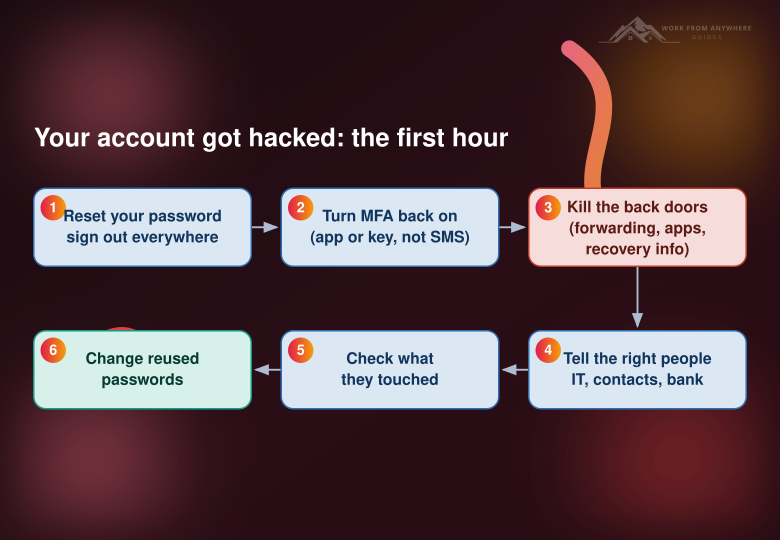
1. Get back in and reset the password
Do this from a device you trust, not the one you think might be infected. Pick a brand-new password you've never used anywhere else. Then find the "sign out of all devices" or "log out all sessions" option and use it. That kicks the attacker out of any session they've still got open.
2. Turn MFA back on
If you had two-factor turned on, the attacker may have removed it. Switch it back on, and use an authenticator app or a hardware key instead of text-message codes, which are easier to intercept.
3. Kill the back doors (the step people skip)
Changing your password does nothing if the attacker left themselves a way back in. Check three things: your recovery email and phone number (they love to swap these to one they control), any mail forwarding rules that quietly copy your messages elsewhere, and the list of connected apps or "app passwords" with access to your account. Revoke anything you don't recognize.
4. Tell the right people, in order
If it's a work account, message your IT or security team first, right away. Don't try to quietly fix it and hope nobody notices, because that just gives the attacker more time. Next, warn anyone the attacker could scam while pretending to be you. If money or a payment method was attached, call your bank.
5. Find out what they touched
Look at your sent folder and your deleted folder, since attackers often delete the replies. Check recent login activity for unfamiliar locations or devices. See if anything was bought, changed, or sent in your name.
6. Change your reused passwords
If that password was used on any other account, treat those as next in line. This is the moment to get a password manager so every account has its own password and a hack never spreads like this again.
What not to do
Don't just change the password and walk away, because of step 3. Don't pay anyone who slides into your messages promising to "recover" your account, since they're part of the problem. And don't panic-delete everything, because you may need that trail to see what happened.



Leave a Reply
Comments